> ## Documentation Index
> Fetch the complete documentation index at: https://docs.mercurjs.com/llms.txt
> Use this file to discover all available pages before exploring further.
# Backend Architecture
> Understand how Mercur extends Medusa using a modular plugin architecture and a powerful customization layer.
# Backend Architecture
Mercur’s backend is built directly on top of the **Medusa Framework**.\
Instead of replacing Medusa or hiding its internals, Mercur uses Medusa’s native plugin mechanism to introduce all marketplace logic-keeping the entire system transparent, modular, and fully extensible.
This allows developers to build custom marketplace functionality the same way they would build a custom Medusa project, while also having access to Mercur’s marketplace services, workflows, and APIs.
Check Mercur main repository:
Github
***
# Architecture Overview
Mercur extends Medusa through a set of modular Medusa plugins.\
Together, Medusa + Mercur form a single backend application with a unified API surface.
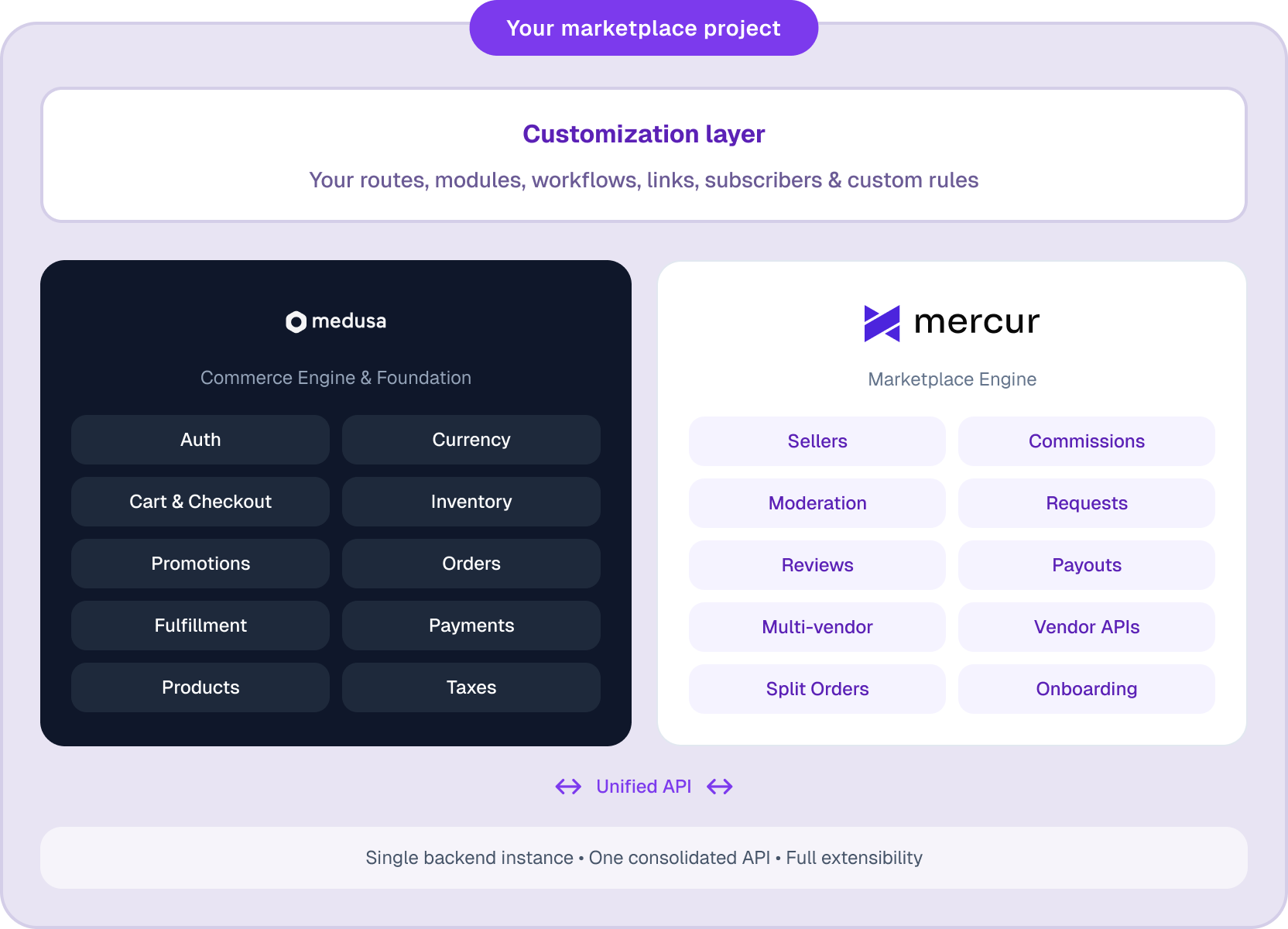 The structure consists of three layers:
### **1. Medusa Core (commerce engine)**
Handles core commerce primitives: products, pricing, carts, orders, customers, payments, inventory, fulfillment, etc.
### **2. Mercur (marketplace engine)**
Adds marketplace domain logic: sellers, commissions, moderation, requests, reviews, payouts, multi-vendor flows, and vendor-facing APIs.
### **3. Customization Layer (your code)**
Your project’s own routes, modules, workflows, links, subscribers, and custom rules - built exactly the same way you customize a standard Medusa project.
You can extend **both Medusa and Mercur** through this customization layer.\
This gives you access to all Medusa APIs and all Mercur APIs as one combined system, while keeping your domain-specific logic separated and easy to maintain.
***
# Plugin-Based Marketplace Architecture
Mercur is delivered as a **collection of Medusa plugins**, each implemented as a separate npm package.
This has several advantages:
* Install only the packages your project needs
* Keep upgrades isolated and predictable
* Clean overrides and customizations
* Full compatibility with Medusa’s architecture
* Your custom code stays separate from Mercur’s internals
Typical setup includes packages like:
* `@mercurjs/framework`
* `@mercurjs/b2c-core`
* `@mercurjs/commission`
* `@mercurjs/requests`
* `@mercurjs/reviews`
* `@mercurjs/algolia`
* `@mercurjs/resend`
* `@mercurjs/payment-stripe-connect`
More packages are being added for advanced or niche marketplace cases, such as B2B procurement flows.
***
# Unified Medusa + Mercur API
Because Mercur is implemented as Medusa plugins, the backend exposes **one unified API** containing:
* All Medusa Admin API endpoints
* All Medusa Store API endpoints
* All Mercur Admin API endpoints
* All Mercur Vendor API endpoints
* All Mercur Store API endpoints
Everything runs inside a single Medusa server instance.
No separate services, no proxying - a single consolidated backend.
***
# Three APIs and Actors
Mercur introduces three API surfaces built on Medusa’s routing system:
### **Admin API**
For platform operators managing the marketplace.
### **Vendor API**
A dedicated API for sellers, giving access only to their own products, orders, reviews, and Marketplace features.
### **Store API**
Customer-facing commerce operations.
Mercur defines three actors:
* **User (Admin)**
* **Seller**
* **Customer**
Medusa’s authentication middleware ensures the correct actor accesses the correct API.
***
# Customizing Mercur
Everything in Mercur is built using **Medusa Framework conventions**, which means you can customize Mercur in the exact same way you customize any Medusa project - modules, workflows, routes, links, subscribers, scheduled jobs, data models, and more.
Learn more about the underlying customization patterns in the\
[**Framework**](../framework) section.
***
# Using the Mercur CLI
The Mercur CLI provides the fastest path to starting a project.\
It automatically:
* scaffolds a full Medusa application
* installs and configures all Mercur packages
* prepares environment variables
* seeds initial data
* and creates a **clean, empty customization layer** for your project code
This means you start with:
* A ready-to-run Medusa + Mercur backend
* Clear separation between Mercur code and your custom code
* A structure designed for maintainability and upgrades
* Full access to Medusa and Mercur APIs out of the box
The CLI essentially gives you the ideal development foundation:\
a fresh customization layer on top of a fully wired marketplace engine.
***
# Why This Architecture Matters
This design gives you:
* **All of Medusa’s flexibility**
* **All of Mercur’s marketplace capabilities**
* Safe and predictable upgrades
* Separation of your custom logic from vendor code
* Long-term maintainability
* No vendor lock-in (MIT-licensed, plugin-based, transparent)
* A single, unified backend instead of a distributed patchwork
It is the best combination for projects that require both marketplace complexity and full control over the backend architecture.
***
The structure consists of three layers:
### **1. Medusa Core (commerce engine)**
Handles core commerce primitives: products, pricing, carts, orders, customers, payments, inventory, fulfillment, etc.
### **2. Mercur (marketplace engine)**
Adds marketplace domain logic: sellers, commissions, moderation, requests, reviews, payouts, multi-vendor flows, and vendor-facing APIs.
### **3. Customization Layer (your code)**
Your project’s own routes, modules, workflows, links, subscribers, and custom rules - built exactly the same way you customize a standard Medusa project.
You can extend **both Medusa and Mercur** through this customization layer.\
This gives you access to all Medusa APIs and all Mercur APIs as one combined system, while keeping your domain-specific logic separated and easy to maintain.
***
# Plugin-Based Marketplace Architecture
Mercur is delivered as a **collection of Medusa plugins**, each implemented as a separate npm package.
This has several advantages:
* Install only the packages your project needs
* Keep upgrades isolated and predictable
* Clean overrides and customizations
* Full compatibility with Medusa’s architecture
* Your custom code stays separate from Mercur’s internals
Typical setup includes packages like:
* `@mercurjs/framework`
* `@mercurjs/b2c-core`
* `@mercurjs/commission`
* `@mercurjs/requests`
* `@mercurjs/reviews`
* `@mercurjs/algolia`
* `@mercurjs/resend`
* `@mercurjs/payment-stripe-connect`
More packages are being added for advanced or niche marketplace cases, such as B2B procurement flows.
***
# Unified Medusa + Mercur API
Because Mercur is implemented as Medusa plugins, the backend exposes **one unified API** containing:
* All Medusa Admin API endpoints
* All Medusa Store API endpoints
* All Mercur Admin API endpoints
* All Mercur Vendor API endpoints
* All Mercur Store API endpoints
Everything runs inside a single Medusa server instance.
No separate services, no proxying - a single consolidated backend.
***
# Three APIs and Actors
Mercur introduces three API surfaces built on Medusa’s routing system:
### **Admin API**
For platform operators managing the marketplace.
### **Vendor API**
A dedicated API for sellers, giving access only to their own products, orders, reviews, and Marketplace features.
### **Store API**
Customer-facing commerce operations.
Mercur defines three actors:
* **User (Admin)**
* **Seller**
* **Customer**
Medusa’s authentication middleware ensures the correct actor accesses the correct API.
***
# Customizing Mercur
Everything in Mercur is built using **Medusa Framework conventions**, which means you can customize Mercur in the exact same way you customize any Medusa project - modules, workflows, routes, links, subscribers, scheduled jobs, data models, and more.
Learn more about the underlying customization patterns in the\
[**Framework**](../framework) section.
***
# Using the Mercur CLI
The Mercur CLI provides the fastest path to starting a project.\
It automatically:
* scaffolds a full Medusa application
* installs and configures all Mercur packages
* prepares environment variables
* seeds initial data
* and creates a **clean, empty customization layer** for your project code
This means you start with:
* A ready-to-run Medusa + Mercur backend
* Clear separation between Mercur code and your custom code
* A structure designed for maintainability and upgrades
* Full access to Medusa and Mercur APIs out of the box
The CLI essentially gives you the ideal development foundation:\
a fresh customization layer on top of a fully wired marketplace engine.
***
# Why This Architecture Matters
This design gives you:
* **All of Medusa’s flexibility**
* **All of Mercur’s marketplace capabilities**
* Safe and predictable upgrades
* Separation of your custom logic from vendor code
* Long-term maintainability
* No vendor lock-in (MIT-licensed, plugin-based, transparent)
* A single, unified backend instead of a distributed patchwork
It is the best combination for projects that require both marketplace complexity and full control over the backend architecture.
***